Don’t count minutes.
Just coach.

The assistant coach that keeps every kid's minutes fair. Say the sub, the goal or the clock out loud, and it's done.

Fair minutes, without the math.

Squadly counts every kid's minutes while the game runs and tells you who's due in next. At full time, the numbers are already done.

Hi coach! I'm Squadly. Plan the night before. It's on your phone too. Game day? Say the sub. Tap, and it's done. I keep every kid's minutes fair. Free for every coach through Dec 31, 2026.

Watch it on YouTube

Your roster is already somewhere.

Connect TeamSnap, or drop in the CSV your league's system exports. Squadly reads the columns and fills in your team.

TeamSnap

Connected

Import into Squadly

  • Stallions U1012 players · 9 games
  • Stallions U1214 players · 8 games

Roster · Stallions U10

9 games added to the schedule

On a computer, the desk at heysquadly.com takes more than a CSV: an Excel sheet, a calendar file, a PDF schedule, a Word roster or a screenshot, read right there in your browser. Parents' details and birthdays are left out. The example files use column names Squadly reads; your league's export may differ, and Squadly asks when it can't tell. Squadly isn't affiliated with the companies named here.

Say it all at once.

A long request goes to Squadly's online assistant. It works through every part, then puts it all on one card. Nothing changes until you tap Accept.

Say it how you'd say it

Ramble, change your mind halfway, tell it what to leave alone. Squadly works out what you meant: here, Zoe goes on the right, and the sub plan waits, like the coach asked.

A real run with the model Squadly uses today, on our made-up test team. It took 2.0 seconds.

Squadly works it out

It opens the game, reads the roster and works through every part, one step at a time, with the app's own tools. The AI never gets a child's name: each kid is sent as a made-up one, and your phone swaps them back.

When it isn't sure, it asks.

A whole lineup read out, one name misheard. It set up the six it was sure of and asked about the seventh.

One card. Tap accept.

Everything it set up lands on one card, lineup and all. Samir and Jayden were short on minutes today, so tomorrow they get about a quarter more each. Nothing changes until you tap Accept.

The same real run: 2.7 seconds from the last word to this card.

Step one. The coach says: alright put Aoife at right back, Tim on the left side of the middle, Zoe in the middle, no wait Ben's already in the middle, Zoe on the right side then, and don't do the sub plan yet I wanna look at it first. Squadly drops the filler, catches the change of mind and leaves the sub plan alone. The card: Aoife starts at right back; Tim starts at left mid; Zoe starts at right mid. Accept 3 or Cancel.

Step two. The coach says: for tomorrow give Samir and Jayden extra time since they got shorted today, and set up the rest of the lineup. Squadly works through it: Opening the Dolphins game, Samir starts at right back, Jayden starts at left mid, Fill the lineup, Plan the subs, Looking at the game and the roster. The assistant gets made-up names, never the children's: Samir is sent as Frankie and Jayden as Hollis.

Step three. One card with four changes: Samir starts at right back; Jayden starts at left mid; Fill the lineup; Plan the subs, with extra time for Samir and Jayden, and the lineup. Accept 4 or Cancel.

Try it right here.

Tap something a coach would say. The phone is the app's own live-game screen, rebuilt here, with a made-up team.

Tap one to say it

Or say it all at once

Real requests from our test runs, with the names changed to this team. Each starts from Q3, 4:12, 1-1.

Plays what Squadly would do on the phone next to this list.

Quarter 3 · LIVEScore 1 to 1
Quarter 3, 4:12
  • 1Alex
  • 2Jordan
  • 3Sam
  • 4Taylor
  • 5Morgan
  • 6Casey
  • 9Quinn
  • 7Riley
  • 11Blake
  • 14Remy
  • 8Drew
Bench · Mins playedDrag or tap to sub
  • 139'
  • 1011'
  • 1213'
Playing time3 under 50%
Tap Squadly to talk
Say “Jamie on for Jordan”

Talking to Squadly, in the real app

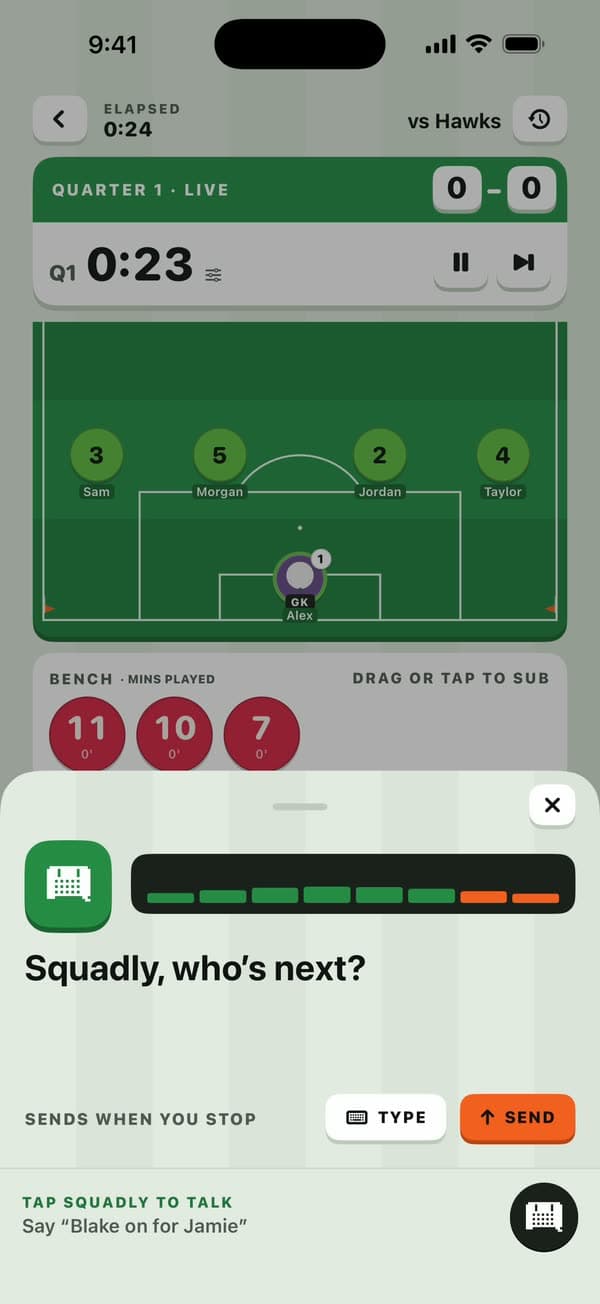
A coach says: squadly, who's next?

Just say it

Tap Squadly in the dock and talk like you would to an assistant coach. It listens until you stop.

whos-next.mov · real recording
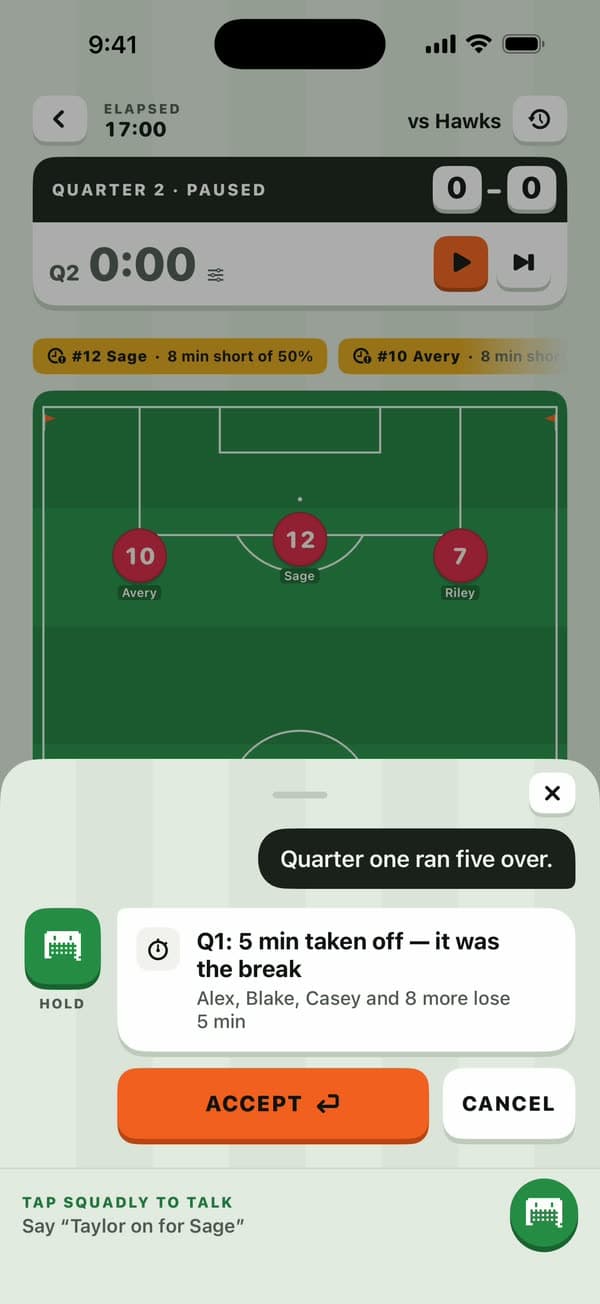
A coach says: quarter one ran five over.

Fix the clock out loud

The whistle came late? Say so. Squadly asks if it was the break, then takes the time off everyone's minutes.

q1-ran-long.mov · real recording

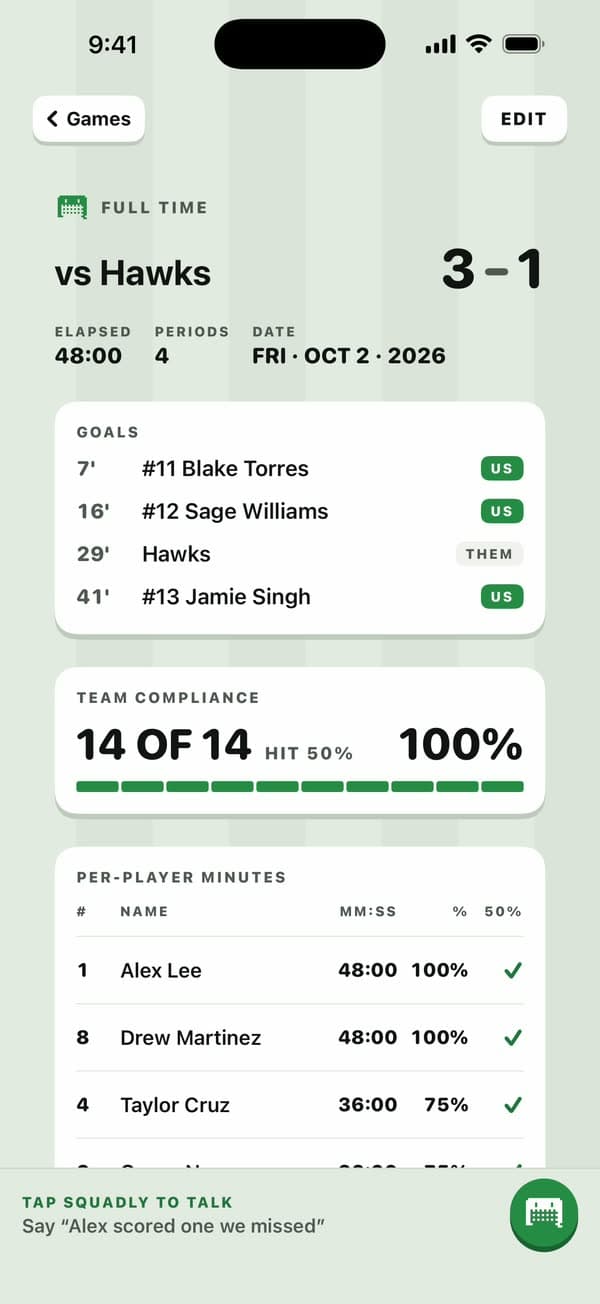
Full time, already added up

Blow the whistle and it's all there: the score, who scored, and every kid's minutes, with a check by everyone who got their half.

full-time.mov · real recording

When you'd rather tap.

Talking is the shortcut. Everything else is a tap, and all of it is free.

Subs, planned before kickoff

Auto-plan lays out every sub for the game, and can rotate positions too. On the sideline the next one waits on a card with a countdown: Sub now, or Skip.

NEXT SUB · Q3 6:00in 1:24

Jamie on for Jordan

Planned rotation

0 OF 6 DONE

Every minute, counted

Each kid's circle fills from red to green as they play, and anyone short of half gets a warning in time to fix it. Then the season adds it all up.

#13 Jamie · 6 min short of 50%
PLAYING TIME3 UNDER 50%
  • 138'
  • 1010'
  • 1212'
  • 623'
  • 919'
  • 726'

A clock that forgives

Pause, next period, and a one-tap way back if you tapped ahead by mistake. Overtime is its own period.

QUARTER 2 · LIVE1 – 1
Q26:52

Tapped ahead by mistake? Back to Q1. At full time, end the game or keep going: Continue (OT).

Your league's rule

5v5 to 11v11, with each size's formations. Count playing time in minutes or quarters, and set how many quarters each kid needs.

Playing timeQuarters
Quarters required
#12 Sage · 2 quarters short of 3 QTRS

Riley would sit a 4th consecutive period.

Violates 3-before-4Override & sub

Two coaches, one game

Invite your assistant coach. Both phones show the same game, and a sub on one shows up on the other.

HEAD

2 coaches online

NEXT SUB · Q3 6:00

Jamie on for Jordan

ASSISTANT

2 coaches online

NEXT SUB · Q3 6:00

Jamie on for Jordan

MAKING SUBS

Tap Sub now on one phone; the other follows.

Your roster in a minute

Bring it in from a spreadsheet or from TeamSnap. Squadly asks which column is which, then imports.

Import from CSVImport from TeamSnap

WHICH COLUMN IS WHICH?

  • PLAYER NAME…
  • JERSEY…
  • POSITION…

Before and during the game

A reminder 30 minutes before kickoff. Then the score, the clock and the next sub on your lock screen.

10:52

Q3 · LIVE1 – 1

vs Hawks

Jamie on for JordanQ3 6:00

Each demo is the app's own screen, rebuilt here with its made-up demo team.

Your team stays yours.

Read the privacy policy
  • Only the coaches on your team can see it
  • No ads, no trackers, and nothing you enter trains AI
  • Existing players' names are swapped before the online assistant sees them

Hi, I'm Eeshan.

I'm a high school student in Mountain View, and I built Squadly.

I grew up playing AYSO in Region 45, and for a couple of those years my dad was my coach. Like almost every AYSO coach, he was a volunteer. He gave up his Saturdays for a team full of kids, me included, and still had to make sure every one of them got their time on the field.

Squadly is for every coach like him, in any league, who shows up for the kids and shouldn't have to do math on the sideline.

I started refereeing last season, so I'm back on AYSO fields most weekends. If something's missing, tell me. It all comes to me.

Eeshan

The app is free. Talking is too.

Talking to Squadly is free for every coach through Dec 31, 2026. No card needed. Nothing renews.

Squadly Free

$0forever

Your game-day essentials. No ads, and no card needed.

  • Subs and the game clock
  • Every kid's minutes, counted live
  • Lineups and season stats
  • CSV import for your roster
  • Team Talk with other coaches
  • Reminders, 30 minutes before kickoff
Get Squadly free

On iPhone, iOS 17.0 or later.

Squadly Pro

Everything in Free, plus your assistant at every game.

$0through Dec 31, 2026

For every coach. No card needed. Nothing renews.

  • Your assistant at every game

    Say or type subs, goals and clock changes.

  • More help with game prep

    Hand Squadly a whole plan, or ask about minutes.

  • Every team you coach

    Covers your teams and the coaches on them.

Use Squadly on the web

Running a league, club or region? We can set up codes that cover your coaches. Talk to us

Good questions.

Is Squadly free?

Yes. Subs, the clock, lineups, stats, CSV import and reminders are free for good, with no ads. Talking to Squadly is free for every coach through Dec 31, 2026. No card needed. Nothing renews.

Is Squadly always listening?

No. Squadly listens when you tap or hold it. A tap listens until you stop talking. A hold sends when you let go.

Does Squadly change things without asking?

Everything shows up as a card first. A clear change you said by name, like a sub, a goal or the clock, goes through after a second or two unless you touch the card.

Anything bigger, like planning all the subs, starting or ending the game, or adding a player, waits for you to tap Accept. So does anything Squadly had to guess, and everything from the online assistant.

Does the AI see my players' names?

Before a long request leaves your phone, players' names are swapped for made-up ones, a new player's too, and your phone swaps them back when the answer arrives.

Cloud hearing is different: it sends the clip of what you said, with your roster's first names, to a speech-to-text service so the names come back spelled right. Type instead of talking if you don't want to send audio.

Who can see my team?

Only the coaches on your team. There are no ads or trackers, and nothing you enter is used to train AI. The details are in the privacy policy.

Is it free for my assistant coach too?

Yes. It's free for every coach on your team through Dec 31, 2026. Nothing to buy.

Can our league or club get codes for its coaches?

Yes. Leagues, clubs and regions can get codes that cover their coaches. Talk to us and we'll set it up.

Is there an Android app?

Not yet. On an Android phone, use Squadly on the web in your browser. The app needs an iPhone with iOS 17.0 or later.

Everybody plays.
Every game.